

Introduction
Brease Next.js API Wrapper Documentation
Complete documentation for integrating Brease CMS with Next.js 15 applications using the brease-next npm package.
What is brease-next?
brease-next is an official TypeScript package for integrating Brease headless CMS with Next.js applications. It provides:
- Type-safe API client functions for fetching content
- React components for rendering pages, sections, and media
- Built-in error handling and response validation
- Automatic static generation support
- SEO metadata generation from CMS data
- Context API for global navigation and collection data
Installation
npm install brease-next
Quick Start
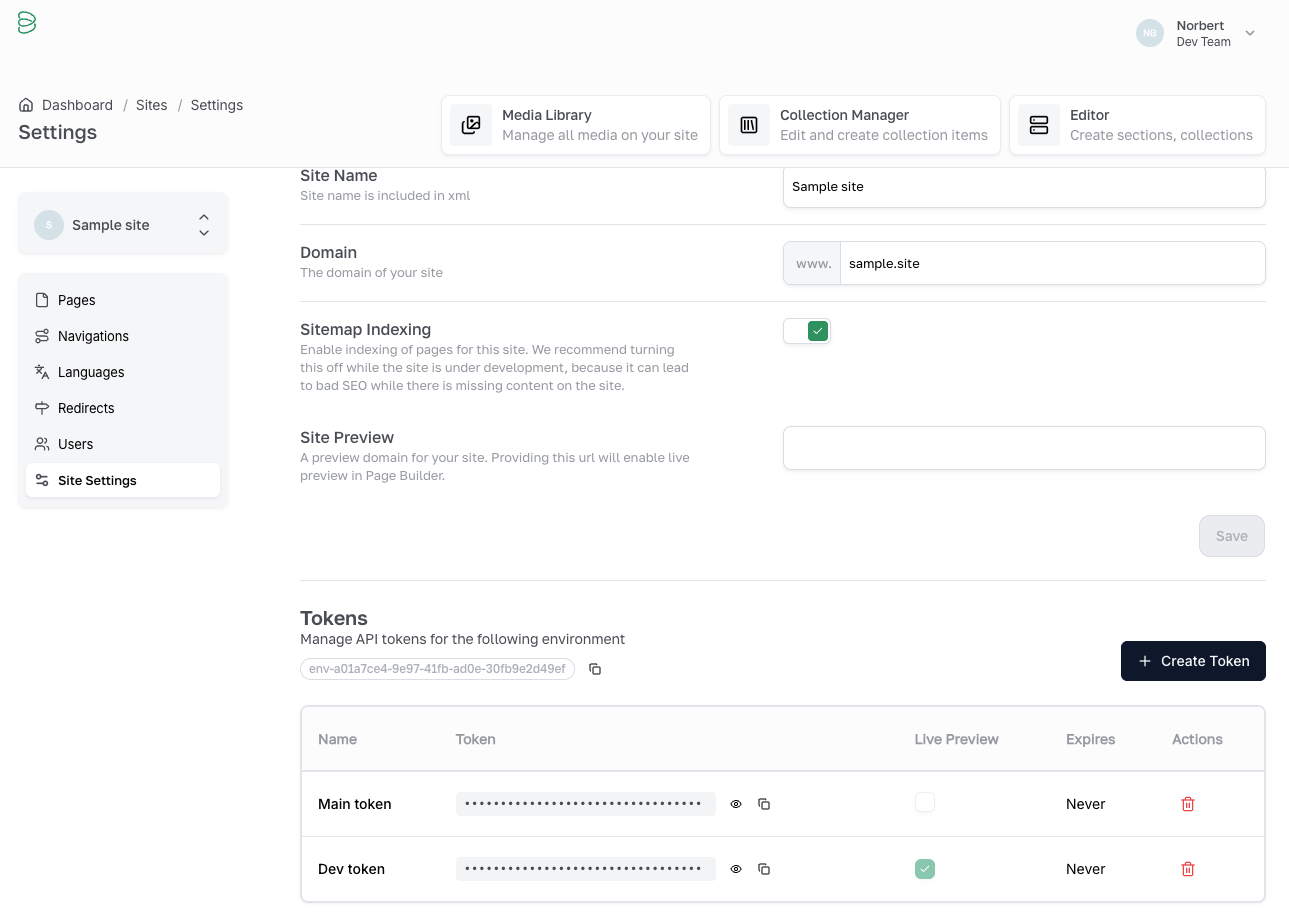
0. Get your Environment data and token from the Brease CMS
Visiting the Brease CMS you need to go to your site's settings, and generate an API token. You can find your environment ID here as well:
1. Configure Environment Variables
Create a .env.local file:
BREASE_BASE_URL=https://api.brease.io/v1
BREASE_TOKEN=your_api_token
BREASE_ENV=your_environment_id
BREASE_REVALIDATION_TIME=30
2. Set Up Root Layout
// src/app/layout.tsx
import { BreaseContext } from 'brease-next';
import { contextData } from '@/lib/brease-config';

export default function RootLayout({ children }) {
  return (
    <html lang="en">
      <body>
        <BreaseContext config={contextData}>
          {children}
        </BreaseContext>
      </body>
    </html>
  );
}
3. Create Configuration
// src/lib/brease-config.ts
import { HeroSection } from '@/sections/hero-section';

export const sectionMap = {
  hero: HeroSection,
};

export const contextData = {
  navigations: [
    { key: 'mainNavigation', id: 'nav-123...' },
  ],
  collections: [
    { key: 'news', id: 'col-456...' },
  ],
};
4. Build a Page
// src/app/page.tsx
import { fetchPage, BreasePage, generateBreasePageMetadata } from 'brease-next';
import { sectionMap } from '@/lib/brease-config';

export async function generateMetadata() {
  return generateBreasePageMetadata('home');
}

export default async function HomePage() {
  const result = await fetchPage('home');

  if (!result.success) {
    return <div>Error loading page</div>;
  }

  return <BreasePage page={result.data} sectionMap={sectionMap} />;
}
Key Features
Type-Safe API Client
All API functions return a BreaseResponse<T> type with success/error states, ensuring type safety throughout your application.
Automatic Static Generation
Built-in functions generate static params for Next.js, enabling pre-rendering at build time.
Flexible Section Mapping
Map Brease section types to React components using a simple configuration object.
Context-Based Data Access
Configure navigations and collections once, access them anywhere with the useBrease() hook.
SEO-Friendly
Automatic metadata generation including OpenGraph tags from CMS content.
Error Handling
Consistent error handling across all API calls with detailed error messages.
Prerequisites
- Next.js 15+ (App Router)
- React 19+
- TypeScript 5+
- Node.js 20+
Package Exports
The package exports everything you need from a single entry point:
import {
  // API Functions
  fetchPage,
  fetchAllPages,
  fetchSite,
  fetchCollectionById,
  fetchEntryBySlug,
  fetchNavigation,
  fetchRedirects,

  // Components
  BreasePage,
  BreaseImage,
  BreaseContext,

  // Hooks
  useBrease,

  // Generators
  generateBreasePageParams,
  generateBreaseCollectionParams,
  generateBreasePageMetadata,

  // Types
  BreaseResponse,
  BreasePage as BreasePageType,
  // ... and more
} from 'brease-next';
Support
For questions or issues:
- Review the Troubleshooting guide
- Check the Examples for reference implementations